This page provides policy information and instructions for using the new PTEAP Application in Self-Service.
The Post-tenure Effort Allocation Policy is available within the UI Policy Manual at:
III.10.5(e) Tenure-Track Faculty
The policy requires each college to record all tenured faculty member's planned allocation of effort among teaching, scholarship/creative activity, service, clinical service, and administrative service.
Units can enter effort data for faculty in all regular tracks including tenure-track, research-track, instructional-track, and clinical-track. Non-tenured track entries are not required, only to be used as a collegiate tracking tool.
General Information
- Reporting is for the length of the appointment only (nine-month or twelve-month).
- DEOs must confer with each tenured faculty member to agree on the faculty member's planned allocation of effort. If a faculty member will be on leave, if possible, a meeting should take place prior to leaving.
- If a department/college wants to change the standard effort allocation for tenured faculty (its "unit norms"), a request must be submitted in writing to the Associate Provost for Faculty and Strategic Operations.
- The faculty roster displays a list of all tenured faculty with appointments as of the late fall semester of the current academic year. Primary, secondary and tertiary appointments are listed. Faculty who are being reviewed for tenure are not required to be included.
Getting Started
- Log into Self-Service, and
- Click on the “Human Resources Systems” tile, and
- Under “Faculty Admin,” click on the “Post-tenure Effort Allocation (PTEAP)” link, and
- Select the “PTEAP Review Year.”
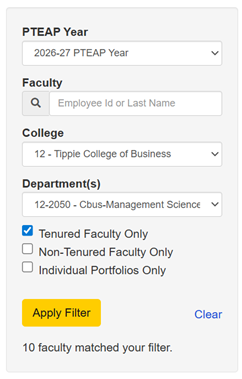
To access a list from the roster, select from these fields and click on “Apply Filter.”
Note: Select “clear” to run the list using different filters.
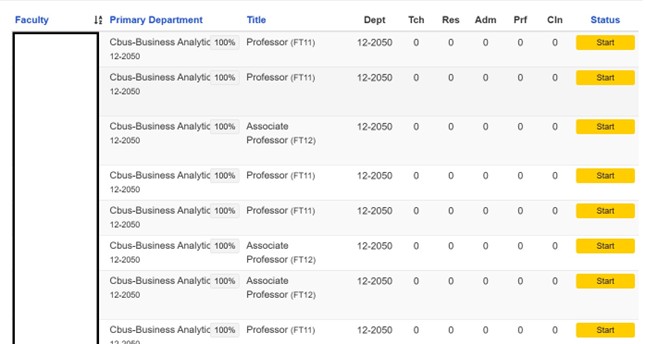
The faculty roster will display all tenured faculty in your department/college. Click on the faculty member’s name to enter the effort allocation data.

Administrators only: Select this button to run reports, view unit norms and enter bulk edits.
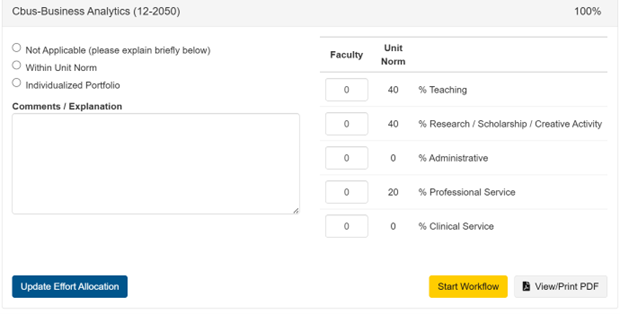
After the data has been entered, the department/college can use the “Start Workflow” option for electronic signature or the “View/Print PDF” form.
General Instructions
- Select one of the following options: “Not Applicable,” “Within Unit Norm,” or “Individualized Portfolio.”
- Select “Within Unit Norm” If the faculty member's effort allocation will fall within ± 5% of the established unit norms (or within the range for units where norms are expressed in ranges).
- If the faculty member will have an “Individualized Portfolio,” enter the effort allocation under the “Faculty” column. The percentages must total 100%.
- If “Not Applicable” is selected, a brief explanation in the Comments/Explanation field is required.
- Examples:
- a faculty member who will take a developmental award during the academic year – 20% Teaching/70% Research/10% Service;
- a faculty member with a major administrative appointment –10% Teaching/40% Research/50% Service;
- a faculty member who has accepted an increased teaching and service load and has therefore reduced the percentage of effort toward research - 50% Teaching/20% Research/30% Service; and
- a faculty member from a department with clinical activity who has increased grant activity - 40% Teaching/30% Research/10% Service/20% Clinical Service.
- The new PTEAP application has an option to generate a workflow form that is routed to the faculty member for electronic signature.
- Select the “Start Workflow” button to generate a pre-populated form. The faculty member will be able to edit and approve the form.
- The “View/Print PDF” button can be selected to print the PDF if the department/college does not want to use the workflow process.
- All forms (workflow or PDF) must be approved by the DEO.
- The Dean is required to approve (via workflow or PDF) any effort allocation outside the unit norm.
Notes about Data Entry
- The percentages must add up to 100%. For a faculty member with a joint appointment in two departments, there should be two separate forms/entries, each totaling 100% allocation of effort within that department.
- To grant access for other admins in your college, complete the access request form.
- If a faculty member should be removed from the list--for example, if they will retire before next academic year, please contact faculty@uiowa.edu.